Copy Paste GameObjects Hierarchy Transforms
This is just a quick EditorWindow Script to copy paste the position and rotation between two GameObject groups with the same hierarchy.
I like create EditorWindows. Actually this is how I got into coding. They are nice, and as long as they work, the performance cleanlyness of the code, and often I did not really completely understand what I was doing. It was a lot of try and error back then.
To call the EditorWindow, you need a MenuItem Attribute, and use a function to show it:
[MenuItem("Window/My Editor Window")]
    private static void Init()
    {
        MyEditorWindow window = (TransformHierarchyCopyPaster)EditorWindow.GetWindow(typeof(TransformHierarchyCopyPaster));
        window.Show();
    }
For referencing objects in the EditorWindow a ObjectPicker is needed, in this case its for GameObjects itself:
obj = (GameObject) EditorGUILayout.ObjectField(obj, typeof(GameObject), true);
Simple reminder to check if some value has changed within the EditorWindow:
EditorGUI.BeginChangeCheck();

// Value that should be checked

if (EditorGUI.EndChangeCheck())
{
   // Do Stuff
}
Thats the code for the Tool.
using System.Collections.Generic;
using UnityEngine;
using UnityEditor;

public class TransformHierarchyCopyPaster : EditorWindow
{
    public GameObject obj = null;
    public GameObject newObj = null;
    public List<Transform> originalTransform = new List<Transform>();
    public List<Transform> newTransform = new List<Transform>();
    public string statusLabel = "Press Get Transform";

    [MenuItem("Artist Tools/Copy Paste Transform Hierarchy")]
    private static void Init()
    {
        TransformHierarchyCopyPaster window = (TransformHierarchyCopyPaster)EditorWindow.GetWindow(typeof(TransformHierarchyCopyPaster));
        window.Show();
    }

    private void OnGUI()
    {
        GUIStyle statusLabelStyle = new GUIStyle();

        EditorGUI.BeginChangeCheck();

        GUILayout.Label("Original", EditorStyles.boldLabel);
        obj = (GameObject) EditorGUILayout.ObjectField(obj, typeof(GameObject), true);

        GUILayout.Label("New", EditorStyles.boldLabel);
        newObj = (GameObject) EditorGUILayout.ObjectField(newObj, typeof(GameObject), true);

        GUILayout.Space(10);

        if (EditorGUI.EndChangeCheck())
        {
            statusLabel = "<color=yellow>Press Get Transform</color>";
        }

        GUILayout.Label(statusLabel, statusLabelStyle);


        if (GUILayout.Button("Get Transforms"))
        {
            originalTransform.Clear();
            newTransform.Clear();

            foreach (Transform child in obj.transform.GetComponentsInChildren<Transform>())
            {
                originalTransform.Add(child);
            }

            foreach (Transform child in newObj.transform.GetComponentsInChildren<Transform>())
            {
                newTransform.Add(child);
            }
            statusLabel = "<color=green>Ready to CopyPaste Transforms</color>";
        }

        if (GUILayout.Button("CopyPaste Transforms"))
        {
            for (int i = 0; i < originalTransform.Count; i++)
            {
                newTransform[i].position = originalTransform[i].position;
                newTransform[i].rotation = originalTransform[i].rotation;
            }
            Undo.RegisterCreatedObjectUndo(newObj, "Transform Changed");
        }
    }
}
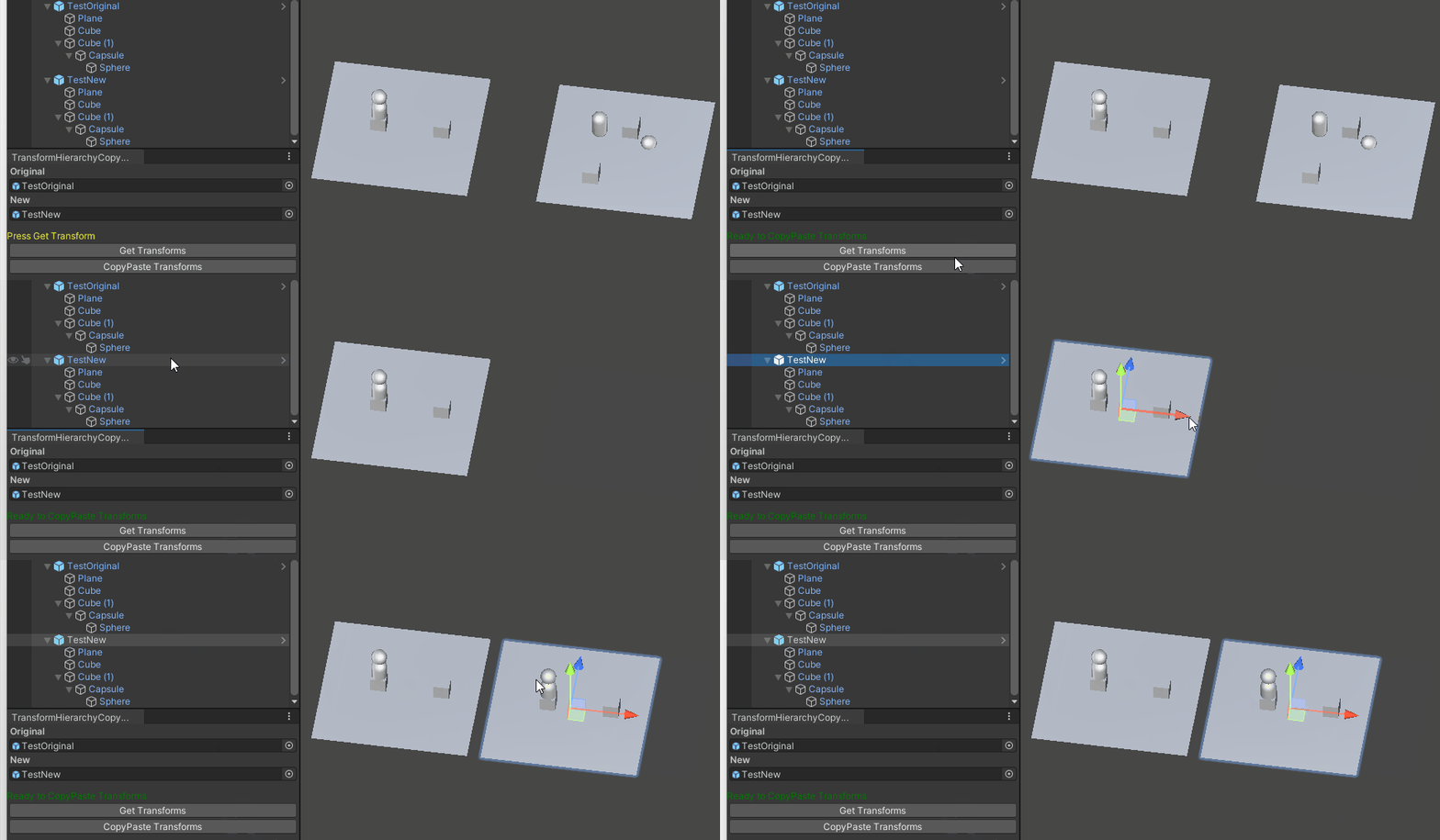
Just to show what it does and how the Tool itself looks in a simple example.
Leave a Reply